
MoloFolio
The foldable smartphone for FiveM. This guide takes you from download to a running phone, then through every setting worth knowing.
- Resource
- molo_phone
- Current version
- 2.3.1
- Resmon
- 0.00 ms closed · ~0.02 ms open
- Frameworks
- ESX, QBCore, QBox, Standalone
- Languages
- 13
Overview
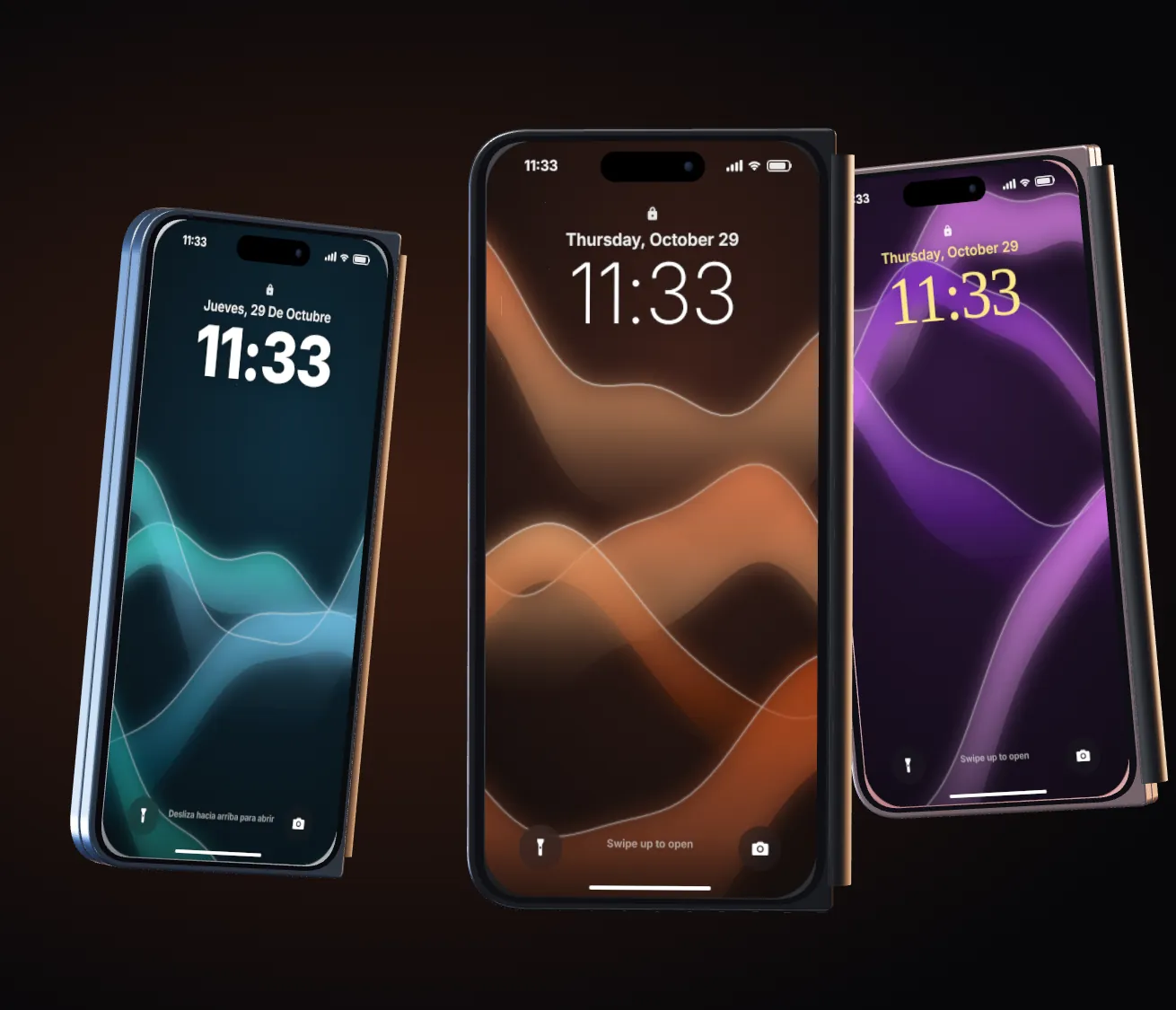
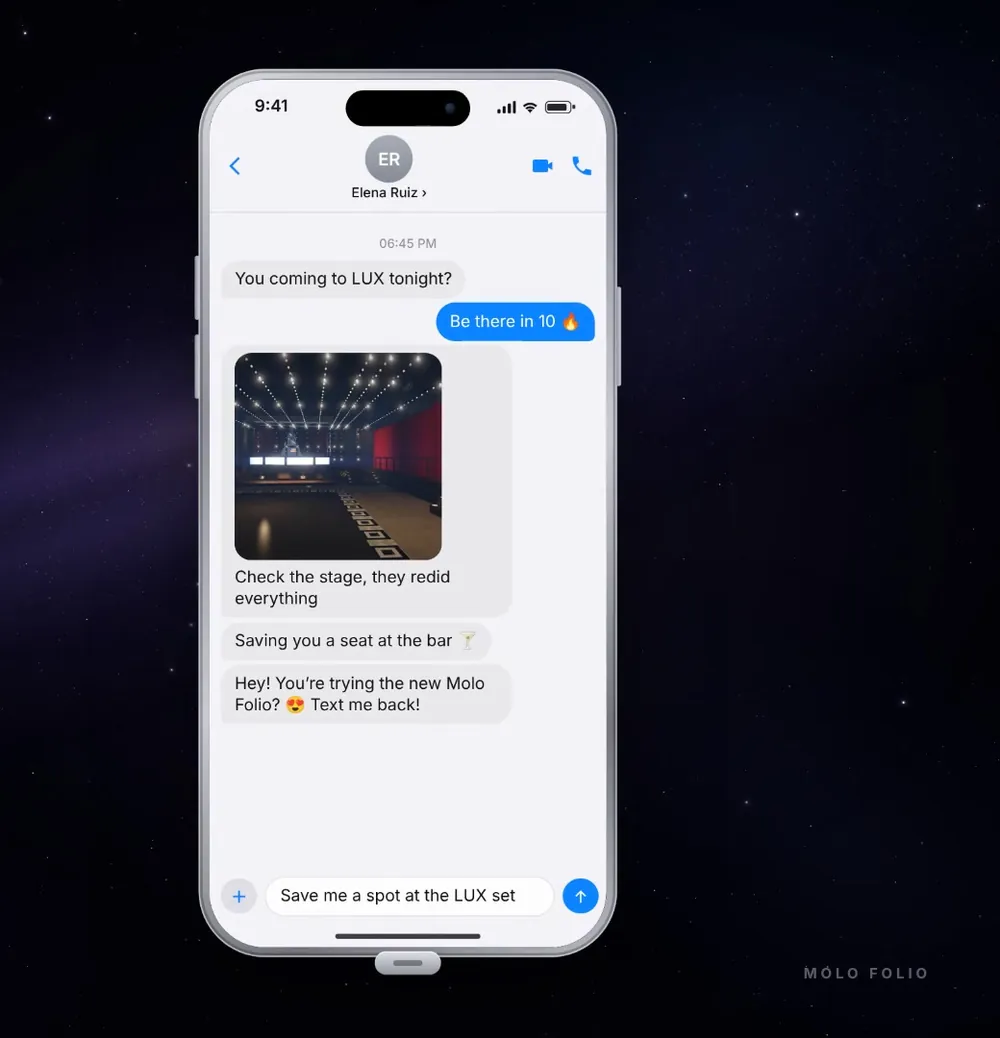
Molo Folio is a book-style foldable phone. Folded, it is a normal smartphone with one screen. Unfolded, it opens like a book and shows two apps side by side, so a player can read Messages on one half and scroll InstaPic on the other.
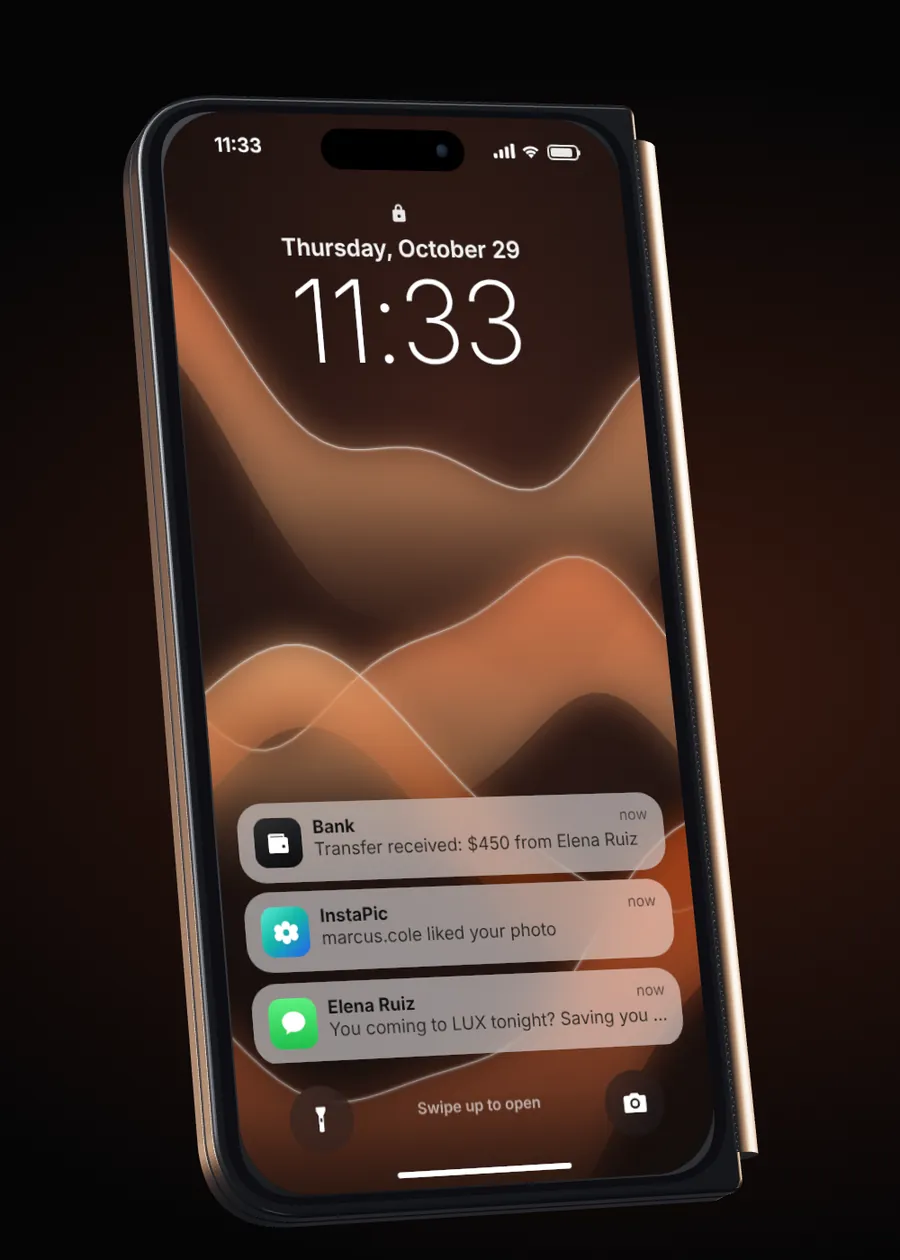
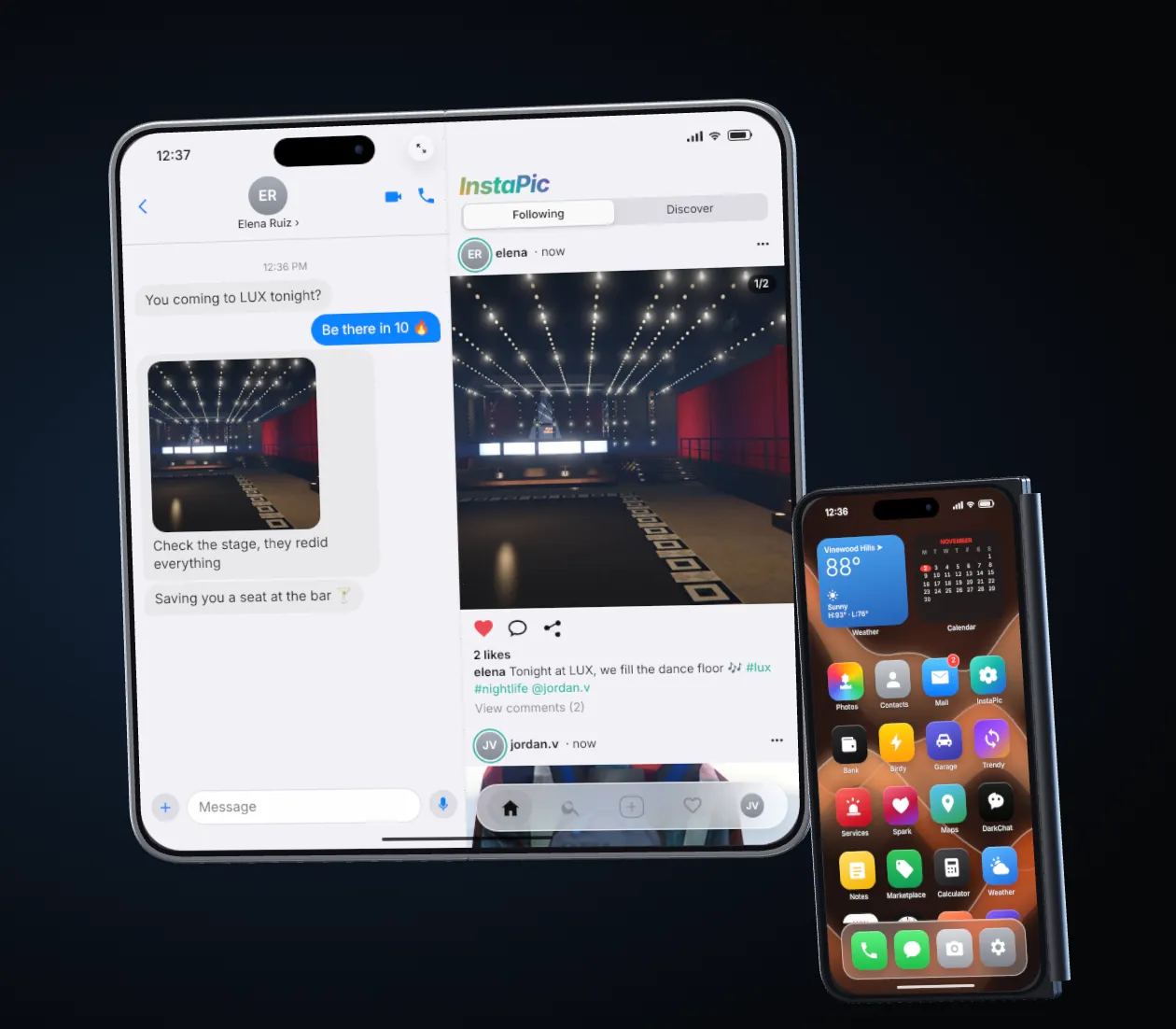
- 25+ apps: calls and video calls, messages with groups and voice notes, camera, social apps, bank, garage, services, weather, crypto, news and more.
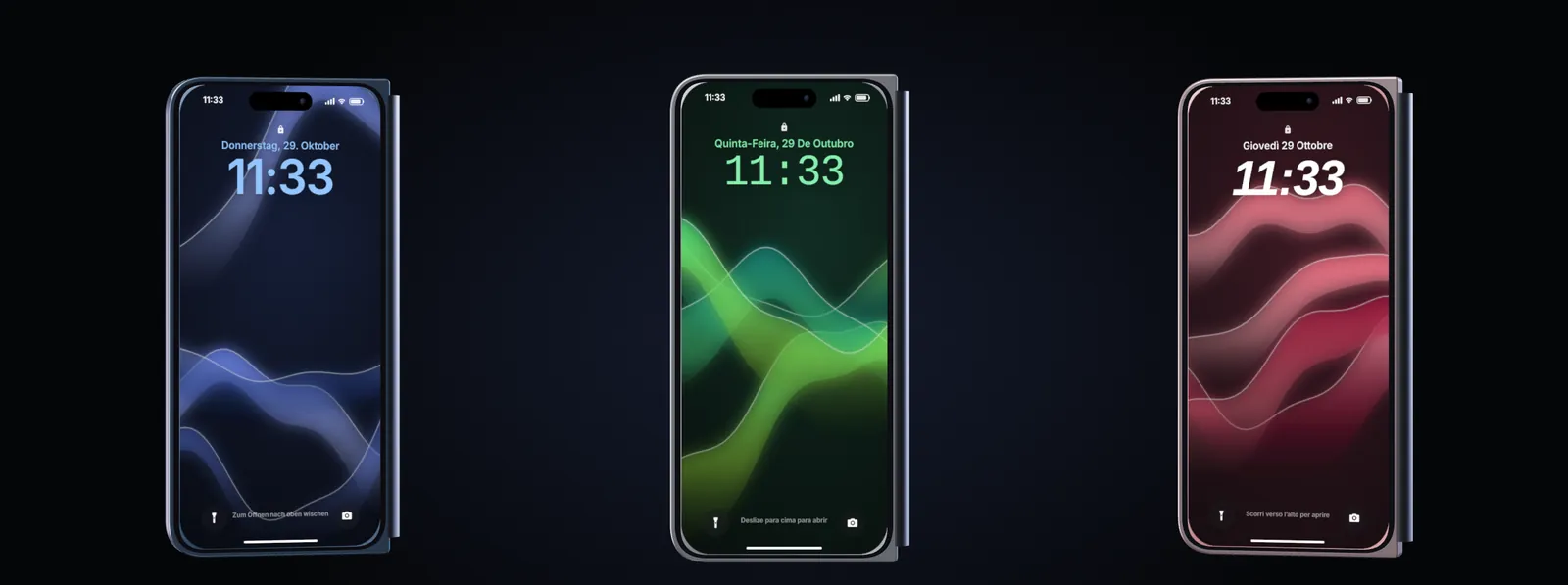
- 13 languages: English, French, Spanish, Portuguese, Italian, German, Dutch, Swedish, Polish, Romanian, Czech, Turkish and Russian. Each player can pick their own.
- Any framework: ESX, QBCore, QBox or Standalone, detected automatically.
- A real 3D phone: it comes out showing the back, flips to the cover screen and the hinge opens with visible thickness. In the character's hand, the free half really rotates around the hinge.
- No database required: with oxmysql the tables are created on start; without it, everything is saved in a file.
Try it without the game. Open html/index.html from the resource in your browser: the phone shows up with demo data, so you can look around before installing.
Installation
About 5 minutesWhat you need
- A FiveM server running ESX, QBCore, QBox, or no framework at all (Standalone).
- The two resources from your download:
molo_phoneandmolo_phone_props. - Optional:
oxmysql. With it, data goes to your MySQL database. Without it, the phone stores everything inmolo_phone_data.json. Migrating from LB Phone or Quasar does need oxmysql.
Step by step
- Copy both folders into
resources/Putmolo_phoneandmolo_phone_propsin your server's resources folder. The 3D phone models live in their own resource so you can restartmolo_phonewithout crashing players who are holding the phone. - Database: nothing to import
With oxmysql the tables are created automatically on first start. If you prefer importing by hand,
sql/install.sqlis included. - Add the resources to
server.cfgPlace these lines after your framework, inventory and voice resources. The props must start first.ensure oxmysql # optional, only if you use MySQL # ... your framework, inventory and voice resources ... ensure molo_phone_props ensure molo_phone - Make sure a
phoneitem exists By default players need a phone item to open the phone. The accepted item names are set inConfig.PhoneItems(default{ 'phone', 'molo_folio' }). If your inventory has no such item yet, add one with the snippets below, or setConfig.RequireItem = falseso everyone can open the phone without an item. - Restart the server and open the phone
Press F1 or type
/phone. Players can change the key in FiveM Settings → Key Bindings. On start, the server console prints the framework and the integrations it detected.
Adding the phone item
Only add the item if your inventory does not already have one called phone. Keep it non-stackable: with unique phones, each phone item carries its own number.
ox_inventory (also QBox)
['phone'] = {
    label = 'Phone',
    weight = 190,
    stack = false,
    close = true,
    description = 'Molo Folio foldable smartphone',
},
QBCore (qb-inventory, ps-inventory, lj-inventory)
QBCore usually ships a phone item already. If yours does not:
phone = {
    name = 'phone', label = 'Phone', weight = 190, type = 'item',
    image = 'phone.png', unique = true, useable = false, shouldClose = true,
    description = 'Molo Folio foldable smartphone',
},
qs-inventory
Same fields as QBCore, in qs-inventory's items file. Set unique = true.
ESX (default inventory)
INSERT INTO `items` (`name`, `label`, `weight`) VALUES ('phone', 'Phone', 1);Unique phones need item data. Storing the number inside the item works with ox_inventory, qs-inventory and qb / ps / lj-inventory. With other inventories, keep it simple: one number per character (Config.UniquePhones = false).
The setup page: molo_folio_setup.html
Open it online with the button above (also included in your download as molo_folio_setup.html): pick your framework, language, app names, phone item, and media storage, and it writes your config.lua and the server.cfg lines for you, with the changed lines highlighted. Its Migration tab gives the exact commands for LB Phone or Quasar. The page runs in your browser and sends nothing anywhere.
Configuration
molo_phone/config.luaEverything is in config.lua, which stays editable even with Cfx Asset Escrow. Restart molo_phone after a change. These are the options most servers touch, with their real defaults.
Basics
| Option | Default | What it does |
|---|---|---|
Config.Framework | 'auto' | Detects qbox, then qbcore, then esx, otherwise standalone. Force one if you need to. |
Config.Locale | 'en' | Default language: en, fr, es, pt, it, de, nl, sv, pl, ro, cs, tr, ru. Players can choose their own in Settings → Language. |
Config.Sounds | 'iphone' | 'iphone' for modern smartphone sounds, 'gta' for the original GTA ringtone and texts, 'off' for silence. |
Config.OpenKey | 'F1' | Default key. Players can rebind it in FiveM settings. |
Config.OpenCommand | 'phone' | Chat command that opens the phone (/phone). |
Config.RequireItem | true | A phone item is needed to open the phone. false = no item needed. |
Config.PhoneItems | { 'phone', 'molo_folio' } | Item names that count as a phone. |
Config.UniquePhones | true | The number lives in the phone item: a stolen, given or picked-up phone keeps its number, messages, photos and accounts. false = one number per character. |
Config.NumberFormat | '555-####' | Format of new numbers, # is a random digit. |
Config.EmergencyNumbers | 911 | Numbers that reach on-duty jobs (police, ambulance by default). They can be called even without signal. |
Config.DefaultFolded | true | The phone opens folded. Config.UnfoldedOnlyApps lists apps that force the big screen. |
Config.DefaultScale | 1.0 | Size on screen, from 0.6 to 1.2. Players can change it. |
Config.DefaultPosition | 'right' | 'right', 'left' or 'center'. |
Config.Voice | 'auto' | 'pma-voice', 'saltychat', 'mumble-voip' or 'none'. |
Config.Currency | '$' | Currency symbol shown in the phone. |
Config.MailDomain | 'molo.mail' | Mail addresses look like username@molo.mail. |
Config.Storage | 'auto' | MySQL if oxmysql is started, otherwise a file. 'json' always uses the file. |
Config.TenorApiKey | '' | Free Tenor key to turn on GIFs in Messages. Empty = GIFs disabled. |
App names
The social apps show names players already recognise. Change any of them, give one name per language, or delete a line to use the built-in name (Pixa, Buzz, Loop, Flame, Shadow, Bazaar). Other apps can be renamed the same way: phone, messages, contacts, camera, gallery, mail, wallet, garage, services, maps, notes…
Config.AppNames = {
    pixa   = 'InstaPic',     -- photos
    buzz   = 'Birdy',        -- short posts
    loop   = 'Trendy',       -- short videos
    flame  = 'Spark',        -- dating
    shadow = 'DarkChat',     -- anonymous rooms
    bazaar = { en = 'Classifieds', fr = 'Petites annonces' },   -- one name per language
}
Battery and signal
| Option | Default | What it does |
|---|---|---|
Config.Battery.Enabled | true | The battery drains and can run flat. |
DrainOpen / DrainCall / DrainIdle | 0.35 / 0.6 / 0.05 | Percent per minute with the phone open, in a call, and in the pocket. |
ChargeInVehicle | true | Charges inside a vehicle at ChargePerMinute (4.0 %). |
Config.Signal.Enabled | true | No signal underground or in dead zones. |
UndergroundZ | -5.0 | Below this height there is no signal (tunnels, basements). |
DeadZones | {} | Extra zones without signal: { coords = vec3(x, y, z), radius = 80.0 }. |
Other scripts (power bank, charger) can recharge the phone with exports.molo_phone:ChargePhone(100) on the client.
Services and dispatch
Config.Services lists who players can call from the Services app. Each entry has an id, a label, the jobs that receive alerts, an icon and a color. Defaults: Police (police, sheriff), EMS (ambulance, ems), Mechanic (mechanic, bennys) and Taxi (taxi). Config.ServicesCooldown = 30 seconds between two requests from the same player, and alerts live for Config.ServicesAlertTTL = 3600 seconds.
Config.Services = {
    { id = 'police', label = 'Police', jobs = { 'police', 'sheriff' }, icon = 'shield', color = '#0a84ff' },
    { id = 'ambulance', label = 'EMS', jobs = { 'ambulance', 'ems' }, icon = 'medic', color = '#ff453a' },
    -- add your own: { id = 'lawyer', label = 'Lawyer', jobs = { 'lawyer' }, icon = 'pin', color = '#bf5af2' },
}
Video calls
Video calls go directly between players (WebRTC). The two public Google STUN servers in Config.VideoCalls.IceServers are usually enough. If some players get no picture, add a TURN server (Cloudflare Calls, Metered…):
Config.VideoCalls = {
    Enabled = true,
    IceServers = {
        { urls = 'stun:stun.l.google.com:19302' },
        { urls = 'stun:stun1.l.google.com:19302' },
        { urls = 'turn:your-turn-server:3478', username = 'user', credential = 'pass' },
    },
}
App settings
Each app has a small block you can adjust freely. The main ones:
| Block | Useful values (defaults) |
|---|---|
Config.Messages | MaxGroupMembers = 15, MaxGroupsPerPhone = 30. Also Config.MaxMessageLength = 500 and Config.CallTimeout = 30 seconds. |
Config.Social | Text limits per app (pixa = 600, buzz = 280, loop = 300), MaxMedia = 4, and VerifiedUsers for verified badges, e.g. { buzz = { 'lspd', 'weazelnews' } }. |
Config.Flame | Spark dating: MinAge = 18, MaxPhotos = 5. |
Config.Shadow | DarkChat: DefaultRooms = { 'General', 'Business', 'Rumors' }, MaxRooms = 60. |
Config.Bazaar | Marketplace: MaxAdsPerPlayer = 10, ads expire after ExpireDays = 14. |
Config.Mail | MaxRecipients = 5, MaxAttachments = 4, KeepPerBox = 300. |
Config.Wallet | Bank: MaxTransfer = 1000000, Cooldown = 3 seconds between transfers. |
Config.Garage | ValetEnabled = true, ValetFee = 250, ValetCooldown = 60, Keys = 'auto' (qb-vehiclekeys, qbx_vehiclekeys, wasabi_carlock, none), ValetForce = false. |
Config.MapPlaces | Useful places in the Maps app (Pillbox Hospital, Mission Row, City Hall, Benny's, LSIA). Add your own with label, x, y, z, icon. |
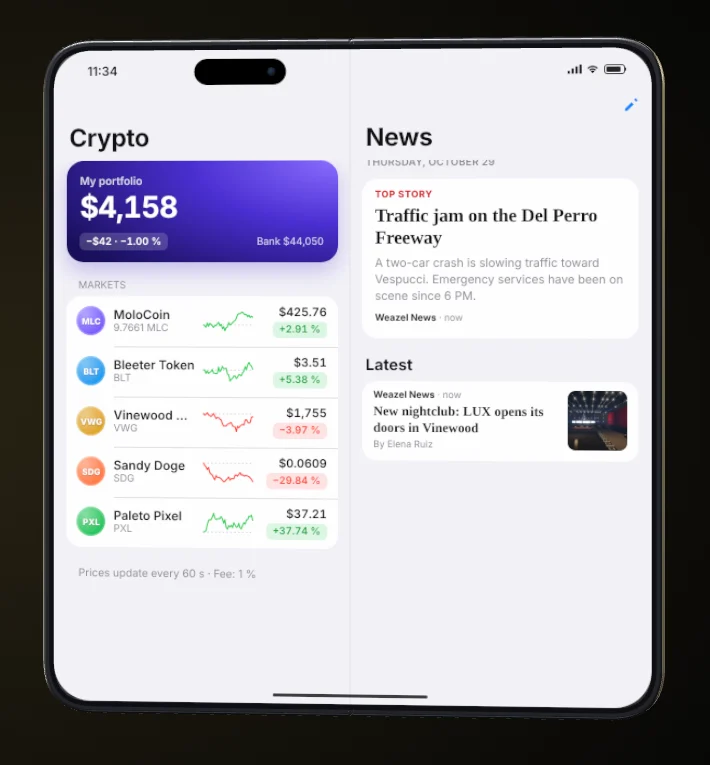
Config.Crypto | Enabled = true, prices update every Interval = 60 seconds, Fee = 0.01 (1 %). Five fictional coins, editable in Coins. |
Config.News | Who can post: Jobs = { 'weazel', 'reporter', 'news' }. Everyone = true lets anyone post (good for standalone). Brand = 'Weazel News'. |
Valet with jg-advancedgarages or cd_garage. These garages keep their own "out / stored" state, so the valet is turned off with them to avoid duplicated vehicles. Only set Config.Garage.ValetForce = true if you adapted your garage for it.
Photos & videos
Config.CameraPhotos, videos and voice notes are uploaded by the server, so storage keys never reach players. Choose where they are kept with Config.Camera.Provider.
| Provider | What to set up |
|---|---|
'local' (default) | Nothing. Files are kept in molo_phone/media/ and served by your FiveM server. On a public server, set your public address (see below). |
'fivemanage' | Put your key in Config.Camera.Fivemanage.ApiKey (from fivemanage.com). |
'discord' | Put a webhook URL in Config.Camera.Discord.Webhook. Discord links expire after about 24 hours, so old photos stop loading. |
'custom' | Your own upload endpoint: Config.Camera.Custom = { Url = '', Field = 'files[]', Headers = {} }. |
If the key for Fivemanage or Discord is not filled in, the phone falls back to 'local' by itself.
Public servers: set the media address
With local storage, players download photos from your server's address. When it cannot be detected, players on a public server see broken images. Add your public IP and port to server.cfg:
set molo_phone_media_url "http://YOUR_IP:30120"You can also write it in Config.Camera.Local.BaseUrl. Left empty, the phone uses the Cfx address of a listed server, or 127.0.0.1 for a local test server.
Limits
MaxPhotosPerPlayer = 300, MaxVideoSeconds = 30, MaxUploadMB = 15 and MaxUploadsPerMinute = 12 per player, to prevent abuse.
Integrations
Detected automaticallyMolo Folio looks for the resources below when it starts and uses the first one it finds. The server console prints what was detected, for example Banking: Renewed-Banking | Billing: okokBilling | Garages: jg-advancedgarages | Inventory: ox_inventory.
| Type | Supported |
|---|---|
| Voice | pma-voice, saltychat, mumble-voip |
| Banking | Renewed-Banking, okokBanking, qb-banking, tgg-banking, snipe-banking, esx_addonaccount, otherwise the framework's own bank money |
| Billing | okokBilling, esx_billing, jim-payments, qb-phone invoices |
| Garages | jg-advancedgarages, cd_garage, okokGarage, qb-garages, qbx_garages, esx_garage, otherwise the framework's vehicle table |
| Inventory | ox_inventory, qs-inventory, codem-inventory, core_inventory, qb-inventory, ps-inventory, lj-inventory |
| Vehicle keys (valet) | qb-vehiclekeys, qbx_vehiclekeys, wasabi_carlock |
Forcing a bridge
If the wrong resource is picked, write its name instead of 'auto'. Voice is set with Config.Voice and vehicle keys with Config.Garage.Keys.
Config.Bridges = {
    Banking = 'okokBanking',
    Billing = 'auto',
    Garages = 'auto',
    Inventory = 'ox_inventory',
}
The bridge files (bridge/) stay open under Escrow, so you can adapt them to a custom resource.
Migrating from LB Phone or Quasar
One command in the server console (not in game) imports your players' data from LB Phone (v1 and v2) or Quasar Smartphone (qs-smartphone). It needs oxmysql and the same database as the old phone.
Commands
Type these one at a time in the server console (txAdmin Live Console or the FXServer window).
| Command | What it does |
|---|---|
molo_phone_migrate lb dry | LB Phone dry run: counts what will be imported, writes nothing. |
molo_phone_migrate lb | Imports LB Phone data (v1 and v2). |
molo_phone_migrate qs dry | Quasar Smartphone dry run. |
molo_phone_migrate qs | Imports Quasar Smartphone data (qs-smartphone). |
molo_phone_migrate schema | Writes migrate_schema.txt (table and column names only) to send to support. |
Safe procedure
- Back up your databaseExport it from HeidiSQL or phpMyAdmin before anything else.
- Install Molo Folio on MySQLKeep
Config.Storage = 'auto'and startoxmysqlbeforemolo_phone. - Stop the old phoneRemove or comment its
ensureline inserver.cfg, but keep its tables in the database. - Run the dry runOn an empty server, in the console:
molo_phone_migrate lb dry(orqs dry). Read what it found. - Run the migration
molo_phone_migrate lb(orqs). Big servers can take a few minutes. If it stops, run it again: finished steps are skipped and it continues where it stopped. - Restart the phone
restart molo_phoneso connected players reload their data.
What is migrated
| From | Data |
|---|---|
| LB Phone | Numbers, contacts (name, favourite, photo), 1-to-1 messages and groups (photos, videos, locations), gallery, notes, mail accounts and mails, Instagram → InstaPic and Twitter → Birdy (profiles, posts, replies, comments, likes, follows), call history, bank history. |
| Quasar Smartphone | Numbers, contacts, SMS, WhatsApp chats and groups, gallery, notes, mails, Instagram → InstaPic, Twitter → Birdy, TikTok → Trendy (profiles, posts, likes, follows). |
| Not migrated | Settings and wallpapers, PIN codes, voicemail, voice memos, dating, DarkChat, stories, notifications. From Quasar, Yellow Pages and invoices are also skipped. |
Phone numbers
- Every character keeps their old number, so contacts and conversations still match.
- If the player already had a Molo number, or the old number is taken by another Molo player, the old data is attached to the right number.
- Quasar numbers are read from
players.charinfoon QBCore / QBox, and fromusers.charinfoorusers.phone_numberon ESX. - Unique phones (
Config.UniquePhones = true): an LB phone item (lbPhoneNumber) or a Quasar phone item (phoneNumber) gets its number and data back the first time it is opened. A blank phone receives its character's migrated number once.
Your old data is never touched. The old phone's tables are only read, never modified or deleted. The command can be run again safely without creating duplicates.
Other Quasar versions
Tables and columns are detected at runtime, and the dry run prints what it found. For qs-smartphone-pro or another version, add your table names in Migrate.QS at the top of server/migrate.lua (the file stays open under Escrow). If the dry run finds nothing, run molo_phone_migrate schema: it writes migrate_schema.txt with table and column names only, no player data. Send that file to support.
Apps
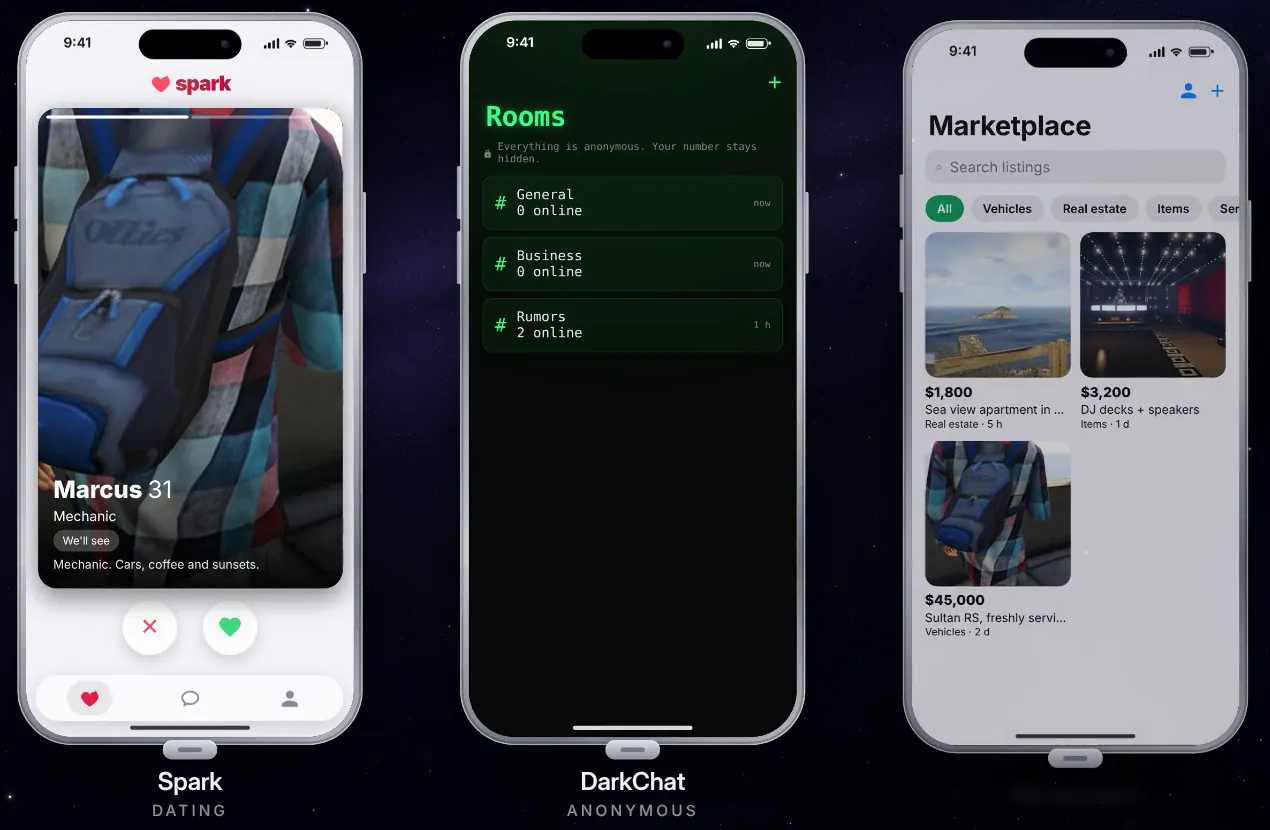
What players can doPlayers install and remove apps from the App Store. Names below are the defaults; you can rename them with Config.AppNames.
Essentials
- Phone
- Voice and video calls, keypad, favourites and recent calls.
- Messages
- Chats and groups with voice notes, GIFs, location, photos and videos, and read receipts.
- Contacts
- Saving an existing number updates that contact instead of creating a duplicate.
- Camera and Photos
- Live viewfinder, photo, video, selfie and landscape mode; a gallery for everything taken.
- Settings and App Store
- Personalise the phone and add or remove apps.
Social
- InstaPic
- Photo posts, comments, likes, follows and private accounts.
- Birdy
- Short posts and replies, with verified badges you assign.
- Trendy
- A feed of short videos.
- Spark
- Dating profiles with photos and a swipe deck.
- DarkChat
- Anonymous rooms with nicknames and optional passwords.
- Marketplace
- Classified ads by category; expired ads are removed automatically.
Services
- Bank
- Balance, transfers to contacts, history and invoices.
- Garage
- Owned vehicles, with a paid valet that brings the car to you.
- Services
- Call police, EMS, mechanics or taxis; on-duty players get the alert and location.
- A personal address like
username@molo.mail, with attachments. - Maps, Notes, Calculator
- Useful places with GPS, personal notes, quick maths.
Everyday
- Weather
- Live in-game weather and time, plus home screen widgets.
- Calendar, Clock, Reminders
- Events, world clocks and to-do reminders.
- Crypto
- A fictional market shared by the whole server; buy and sell with bank money.
- News
- Articles posted by reporters (Weazel News by default), with a notification for each.
Player settings
In the Settings appEach player can make the phone their own. With unique phones, settings follow the phone, not the character.
Control Center
Quick toggles for airplane mode, flashlight, silent mode, Do Not Disturb, dark mode and brightness.
Developers
Exports and SDKServer exports
exports.molo_phone:GetPhoneNumber(src)
exports.molo_phone:GetSourceFromNumber('555-1234')
exports.molo_phone:HasPhone(src)
exports.molo_phone:SendNotification(src, { title = 'Bank', content = 'Transfer received', app = 'settings' })
exports.molo_phone:SendMessage('555-0000', '555-1234', 'Your package has arrived')
exports.molo_phone:GetBankBalance(src)
exports.molo_phone:TransferMoney(src, targetSrc, 500, 'Rent')
exports.molo_phone:SendMail(to, subject, body, sender)
exports.molo_phone:SendDispatch({ service = 'police', title = '...', message = '...', coords = coords, street = '...' })
Also available: AddWalletTransaction(...), SocialPost(...), SocialGetProfile(...).
Client exports
exports.molo_phone:IsOpen()
exports.molo_phone:OpenPhone()
exports.molo_phone:ClosePhone()
exports.molo_phone:GetPhoneNumber()
exports.molo_phone:SendNotification({ title = '...', content = '...' })
exports.molo_phone:ChargePhone(100)   -- power bank, charger...
Third-party apps (SDK)
Add your own app to the phone from any resource. It appears in the App Store under Third-party apps.
exports.molo_phone:AddCustomApp({
    id = 'my_app', name = 'My App', description = 'What the app does',
    icon = 'https://cfx-nui-my_resource/ui/icon.png',
    ui = 'https://cfx-nui-my_resource/ui/index.html',
    defaultInstalled = true,
})
exports.molo_phone:SendCustomAppMessage('my_app', { type = 'update', data = {} })
exports.molo_phone:RemoveCustomApp('my_app')
In your app's HTML, load the SDK:
<script src="https://cfx-nui-molo_phone/html/sdk/molo-phone-sdk.js"></script>It gives you MoloPhone.onReady, MoloPhone.onMessage, MoloPhone.notify, MoloPhone.pickMedia, MoloPhone.contacts and MoloPhone.close.
Troubleshooting
The phone does not open
The player probably has no phone item. Check that an item named in Config.PhoneItems (default phone or molo_folio) exists in your inventory and that the player carries one, or set Config.RequireItem = false. An empty battery also keeps the phone closed until it is charged.
Also check that both molo_phone_props and molo_phone are started, and read the console line that lists the detected framework and inventory.
No picture in video calls
Some players' networks block direct connections. Add a TURN server to Config.VideoCalls.IceServers (Cloudflare Calls, Metered…). See Video calls.
Photos do not load on my public server
With local storage, set your public address in server.cfg: set molo_phone_media_url "http://YOUR_IP:30120", or fill Config.Camera.Local.BaseUrl. With Discord, links expire after about 24 hours; use local storage or Fivemanage for photos that should last.
Can I restart molo_phone while players are online?
Yes. Restart molo_phone only and keep molo_phone_props started. The 3D models live in the props resource, and stopping it while someone holds the phone can crash their game.
My character moves while I type in the phone
This was fixed in 2.1.0: while a text field is focused, keys no longer reach GTA. Make sure you run the latest version.
The migration found nothing or stopped
Run it from the server console, not in game, with oxmysql started and the old phone's tables in the same database. If it stopped, run the same command again: it resumes. For other Quasar versions, see Other Quasar versions and send migrate_schema.txt to support.
Which files can I edit? (Cfx Asset Escrow)
These stay open: config.lua, the language files (html/js/locales/ and shared/locale.lua), the bridges (bridge/), storage (server/db.lua), the migration (server/migrate.lua) and sql/. The rest is protected by Escrow.
Changelog
2.3.1 November 4, 2026 Current
- Lighter client loops when the phone is put away: nothing runs every frame while it is closed. Measured in game with
resmon: 0.00 ms closed, about 0.02 ms open. - Fixed a console error on start (the manifest listed a developer test file that is not shipped).
2.3.0 November 2, 2026
- The Assistant app has been removed.
Config.AIand themolo_phone_ai_keyconvar are no longer used and can be removed.
2.2.1 October 29, 2026
- README links this documentation and the online setup page.
- Setup page: the generated
server.cfglines now includeensure molo_phone_props.
2.2.0 October 29, 2026
Migration
- Quasar Smartphone migration rebuilt on Quasar's published schema (ESX and QBCore): numbers, contacts, SMS, WhatsApp chats and groups, gallery, notes, mails, Instagram → InstaPic, Twitter → Birdy, TikTok → Trendy. Messages stored on both sides are imported once.
- New
molo_phone_migrate schema: writes table and column names (no player data) tomigrate_schema.txtfor support. - A dry run followed by the real migration in the same session now works correctly.
Languages and configuration
- 13 languages (Arabic removed). Every text now exists in every language.
config.luaand console messages are now in English; the default language is English.- New
molo_folio_setup.html: generatesconfig.luaandserver.cfglines, with step-by-step migration instructions.
Fixes
- Contacts: saving an existing number updates that contact instead of creating a duplicate.
- Contact pickers (bank transfers, sharing) show every contact with a search field.
- InstaPic and Birdy ask for confirmation before deleting a post.
- Group events ("X left the group") show as centered lines.
- Bank transfer labels follow the server language.
2.1.0 October 28–29, 2026
molo_phone_migrate <lb|qs> [dry]: imports LB Phone or Quasar Smartphone data.- Local media storage by default; lock screen with passcode, Control Center, battery, signal, Weather, Calendar, Clock, Reminders, Crypto, News, 9 wallpapers.
Config.AppNames,Config.Sounds, per-player language, real 3D phone animation, hinge that rotates in hand.- Security: valet, upload limits, anti-spam, private accounts, and 3D models moved to
molo_phone_props. escrow_ignoreready for Cfx Asset Escrow.
2.0.0 October 28, 2026
- Book-style unfold animation, adjustable size and position, case colours, one- or two-hand grip, landscape camera.
- Unique phones, App Store and third-party app SDK, storage without MySQL.
1.0.0 October 28, 2026
- First release: foldable phone, calls, texts, contacts, camera, gallery, settings, ESX / QBCore / QBox / standalone bridges.
Buy & support
Get Molo Folio
- Sold separatelyTebex store
- Gold subscriptionIncluded
- Silver subscriptionNot included
For support, open a ticket on the Molo Modding Discord. Include your framework, inventory, the console line printed when molo_phone starts, and any error.